Domain Name Phishing with Perfect Timing
Table of Contents
My domain is set to auto-renew, which was confirmed by two reminder emails from Netcup. Some time passed without an invoice or visible payment, so when the email arrived telling me it is expired and would be “permanently deleted in 3 days” my first thought was “Oh no, I forgot to renew it!”.
Good attempt. Just in time - I was a click away from giving them my credentials (good news: it wouldn’t happen that fast anyway, because the password manager wouldn’t match the URL).
What the email looked like #
Subject: Erinnerung: Verlängerung Ihrer Dienste erforderlich (Reminder: renewal of your services required)
Phishing email screenshot
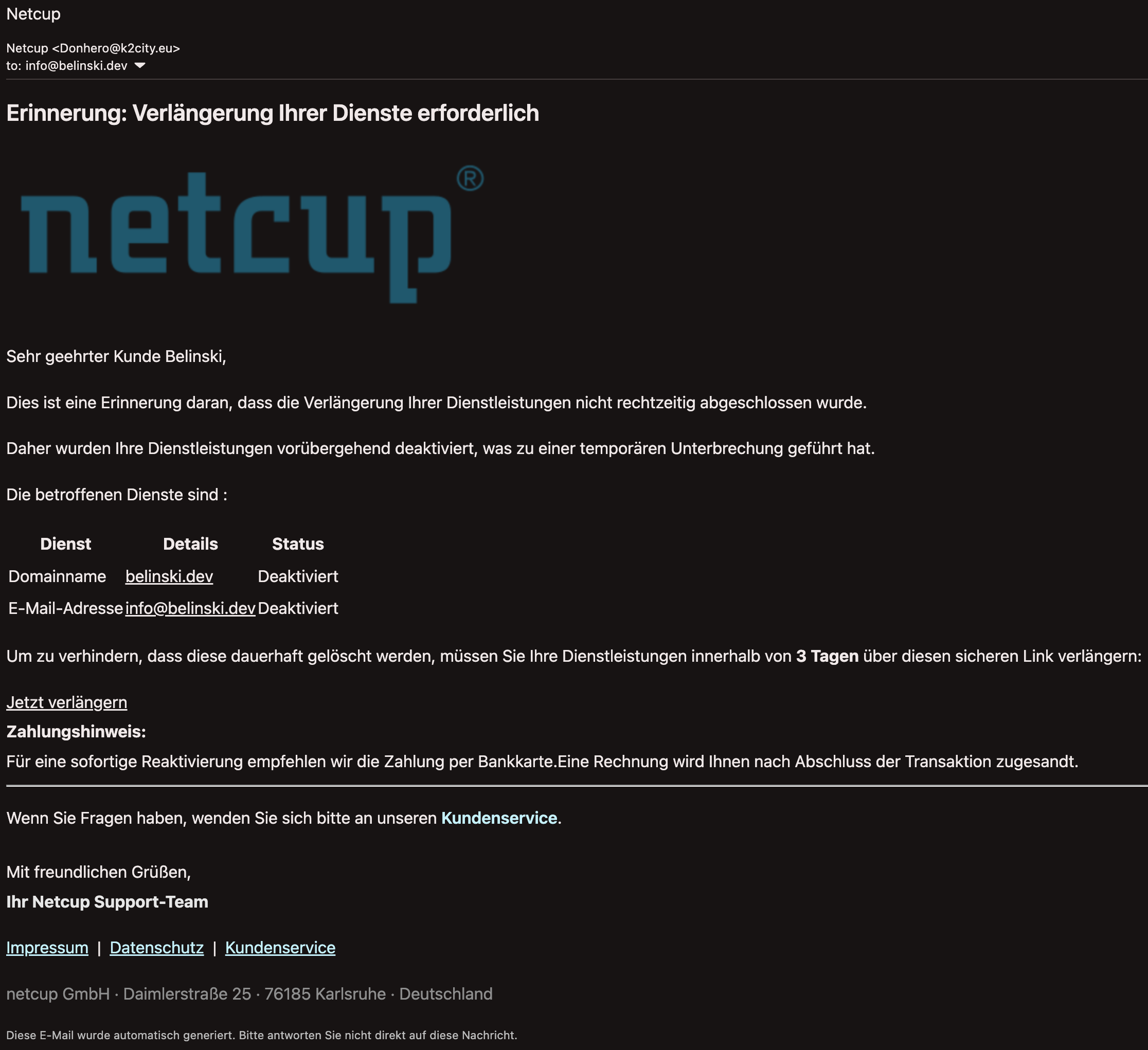
The layout mimics Netcup’s style: their logo, a service table listing belinski.dev and info@belinski.dev as “Deaktiviert”, an urgent renewal button, and a footer with the real Netcup GmbH address in Karlsruhe. Superficially, not terrible.
First suspicion was that the email only mentioned my surname (hardly a secret), but not my first name. Also netcup wouldn’t use this email address - it’s simply not mentioned in my account, otherwise they would communicate with me via deactivated domain (DNS records expire after some time).
How did I make sure that Netcup or any other sender uses the right email address? Some services (like Gmail for example) ignore everything between + and @ sign. For instance myname+netcup@gmail.com would be one of the indicators of a legitimate message. Of course if it’s only used for one specific account and not leaked.
Red flag #1: The sender domain is not what it’s supposed to be #
From: Netcup <Donhero@k2city.eu>
The first and often crucial sign:
The display name says “Netcup”, but the actual address is Donhero@k2city.eu. Not netcup.de. k2city.eu - a domain with zero relationship to Netcup.
The sending server is an OVH Cloud IP in France.
Worth noting: legitimate domain renewal emails from Netcup actually comes from ascio.com, their backend registrar.
Red flag #2: The logo quality #
<img src="https://www.cyberforum.de/fileadmin/user_upload/_processed_/c/4/csm_netcup_logo_schriftzug_v2_vbefaeddb8.png">
The Netcup logo looked somewhat strange to me. It appeared to be taken from cyberforum.de - a German IT forum. They didn’t even bother hosting the image themselves. Netcup’s actual transactional emails serve assets from their partner ascio.com. Same story as with the sender address: not a CDN, not own or partner domain, but something completely different.
Red flag #3: The links #
Warning: following any links outside of an isolated environment is dangerous! Use a dedicated VM or a service like URLScan.io to get a screenshot without visiting it yourself.
The “Jetzt verlängern” (renew now) link:
<a href="http://597817071735.baitboat.be/?id=<domain>">Jetzt verlängern</a>
Let’s count the problems:
- Protocol is HTTP, not HTTPS. in every link.
- Another unknown domain
baitboat.be. - The name alone is its own warning. - The
?id=<domain>parameter is used to personalize the fake landing page - likely pre-fills the domain name on a fake Netcup login to make it look more convincing. - That wasn’t the final destination - the next page (a convincing fake login page) is
http://ea939928.denbyseahaven.co.uk/?3f79e&id=<domain>(compare with the original one) - Footer links are just placeholders with
javascript:void(0)leading nowhere as well as emptymailto:#instead of as support email address.
Hovering over the links in your browser can already show this nonsense in a tooltip.
Fake login page:


Looking at the headers #
The email headers show:
dmarc=pass (dis=neutral p=reject) header.from=k2city.eu
dkim=pass header.d=k2city.eu
Both pass — for k2city.eu. DMARC/DKIM validate that the email was legitimately sent from that domain. They say nothing about whether that domain has anything to do with Netcup. The attacker controls k2city.eu completely, so of course it passes.
Seeing “DMARC pass” does not mean the email is legitimate. It means the claimed sender domain’s authentication checks out — which proves nothing if the domain itself is fraudulent.
Probably all of these have contributed to the successful spam filter bypassing.
What they wanted #
The goal is a credential harvest and possibly acquisition of control over domain names and DNS records. You click the HTTP link, get redirected to a fake Netcup login page (likely served over HTTPS on a different domain to look legitimate), enter your Netcup credentials, and the attacker gets a chance to capture your account.
The urgency (3 days or permanent deletion) is pure pressure to stop you from thinking. The personalization (your name, your domain, your email address) makes it look like a real account notification.
What to actually do #
- Check the raw sender address, not just the display name. It’s a must. Every email client (I hope) can show you this.
- Don’t click links in emails. Go directly to your provider’s control panel in a new browser tab. Type the URL yourself.
- Inspect the link you’re about to click on. Hovering the mouse pointer over it reveals suspicious nuances in a tooltip.
- Report it. I informed Netcup support and asked for checking the actual domain status.
- Use unique email addresses for each account where possible.
Lessons learned #
- Surprisingly, a legitimate email can come from an address which is different from one which you expect, but it’s rare.
- Netcup, like many other services out there, has Phishing page describing some of the phishing cases, but the variety is infinite. Each case is unique and must be assessed individually.
- 2FA can save you even if you find yourself half way (already sent credentials) of giving your account away to criminals. It adds an additional step in the authorization process. Similarly, avoiding password reuse would save other accounts.